Turn One Book into Readable Chapters
Book import is what makes the chapter workflow possible. Split the giant file first, then move through the book in smaller sources that are easier to finish, question, and remember inside NotebookLM.
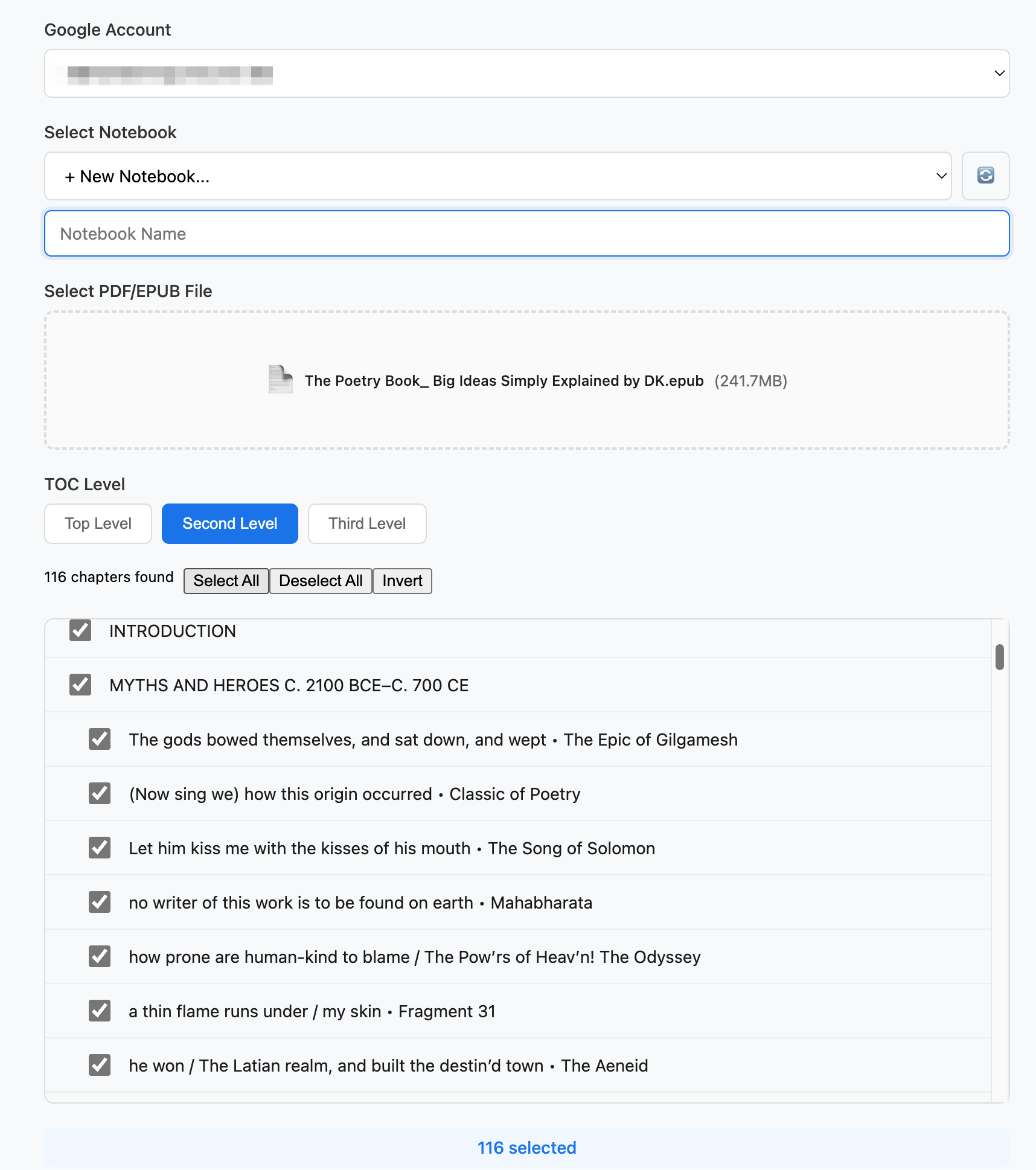
Intelligent Book Splitting
This is the entry point for the reading workflow. Instead of treating one huge book as a single source, NoteKitLM turns it into chapter-sized units so you can read actively, ask better questions, and build retention chapter by chapter.
- Upload a full PDF or EPUB once, then turn it into smaller sources without manual splitting.
- Use the table of contents to create chapter boundaries that match real reading sessions.
- Send each chapter into NotebookLM as its own source so the next chapter always feels doable.
Part of the Workflow:
Intelligent Book Splitting
Split large books into chapter-sized NotebookLM sources so reading, questioning, and review can happen one chapter at a time.
Book Reading Workflow
Split books into chapters before NotebookLM so you can read, question, and review chapter by chapter.
Learn more →Sidebar Assistant
Keep the source open beside NotebookLM so article review, book reading, and research handoff all stay grounded in the original material.
Learn more →Studio Individual
Generate reusable outputs source by source so articles, reports, and book chapters do not all collapse into one generic NotebookLM result.
Learn more →