Import Multiple URLs Instantly
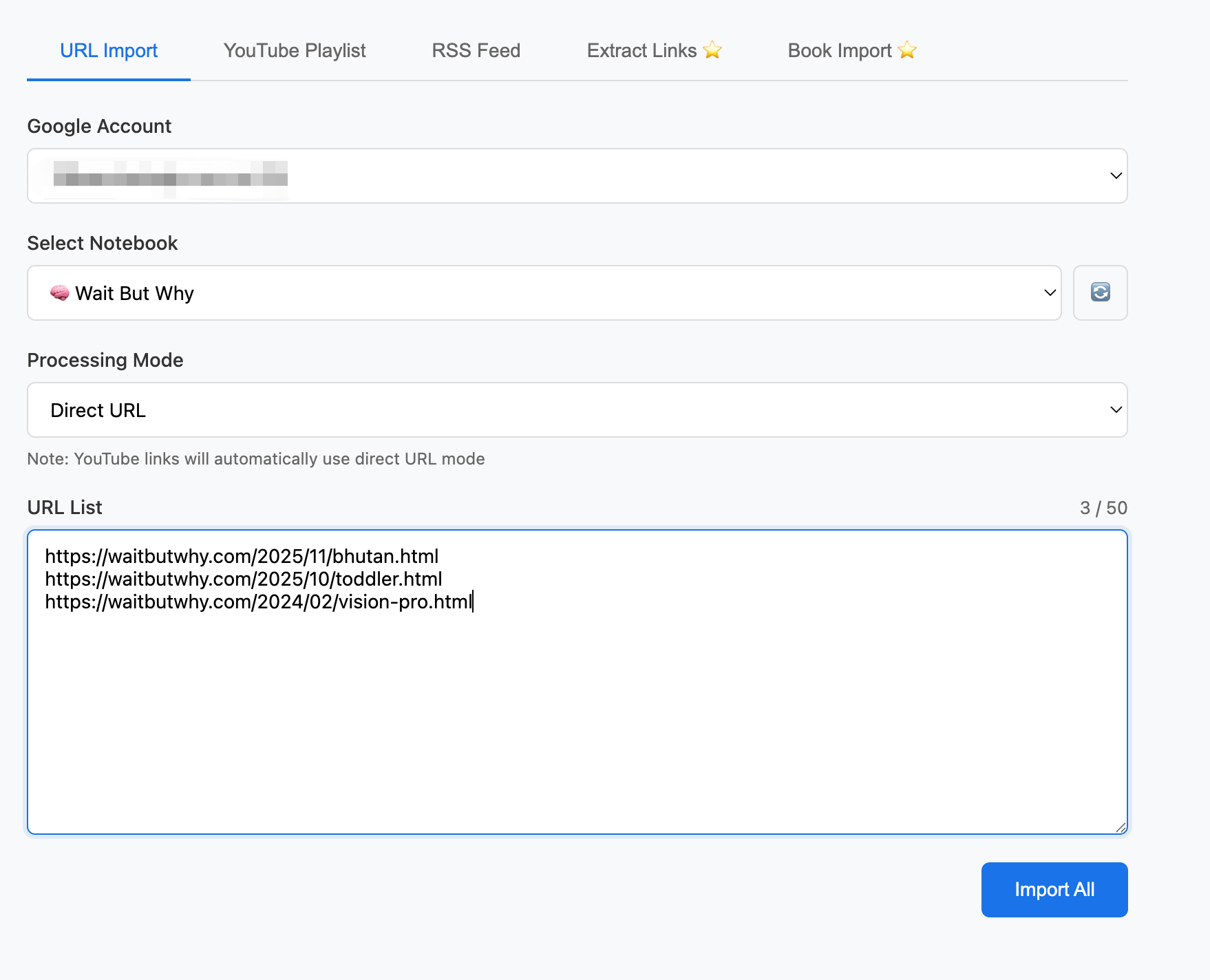
When the page is clean enough for direct import, batch URL import is the fastest path into NotebookLM. Send dozens of links at once and start organizing the reading list before it turns into tab debt.
Stop Wasting Time
For article-heavy workflows, the first bottleneck is getting the good pages into NotebookLM without repetitive copy-paste. Batch URL import handles the clean pages first, so you can reserve PDF capture for the pages that truly need visual preservation.
- Paste up to 50 article URLs at once when direct import is the right capture path.
- Send the whole batch into one notebook so summaries, Q&A, and follow-up outputs start from the same place.
Part of the Workflow:
Web Article Workflow
Capture clean pages by URL, preserve image-heavy or logged-in pages as PDFs, then review everything in NotebookLM with the original article still visible.
Web Article Workflow
Capture clean pages by URL, preserve image-heavy or logged-in pages as PDFs, then review everything in NotebookLM with the original article still visible.
Learn more →RSS Feeds
Pull fresh articles from your feeds into the same NotebookLM workflow you already use for saved reads and research batches.
Learn more →PDF Import
Capture image-heavy or legitimately accessible logged-in pages as PDFs so NotebookLM keeps the visuals and layout that direct URL import would drop.
Learn more →